
User's Manual




Chapter 13 Certificate Screen
NWA1100-N User’s Guide
111
13.4 Certificates Screen
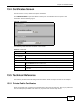
Use this screen to view, delete and import certificates.
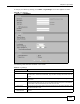
Click CERTIFICATES to open the NWA’s summary list of certificates and to import a new
certificate. See the following figure.
Figure 57 Certificates
The following table describes the labels in this screen.
13.5 Technical Reference
This section provides technical background information about the topics covered in this chapter.
13.5.1 Private-Public Certificates
When using public-key cryptology for authentication, each host has two keys. One key is public and
can be made openly available. The other key is private and must be kept secure.
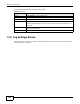
Table 38 Certificates
LABEL DESCRIPTION
Delete Certificate
You can delete
a certificate
Select the certificate from the list that you want to delete.
Delete Click this to delete the selected certificate.
Import Certificate
File Path Enter the location of a previously-saved certificate to upload to the NWA. Alternatively,
click the Browse button to locate a list.
Browse Click this button to locate a previously-saved certificate to upload to the NWA.
Import Click this button to upload the previously-saved certificate displayed in the File Path field
to the NWA.