
User's Manual




Chapter 14 Log Screens
NWA1100-N User’s Guide
116
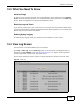
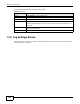
The following table describes the labels in this screen.
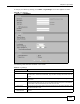
14.5 Log Settings Screen
Use this screen to configure to where and when the NWA is to send the logs and which logs and/or
immediate alerts it is to send.
Table 39 View Log
LABEL DESCRIPTION
Refresh Click Refresh to renew the log screen.
Clear Log Click Clear Log to clear all the logs.
# This field is a sequential value and is not associated with a specific entry.
Time This field displays the time the log was recorded.
Click the column heading to sort the entries. A triangle indicates the direction of the
sort order.
Source This field lists the MAC address of the wireless client that is connected to or failed to
associate with the NWA.
Message This field states the reason for the log.