
User's Manual




Chapter 14 Log Screens
NWA1100-N User’s Guide
117
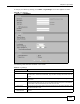
To change your NWA’s log settings, click LOGS > Log Settings. The screen appears as shown.
Figure 62 Log Settings
The following table describes the labels in this screen.
Table 40 Log Settings
LABEL DESCRIPTION
Address Info
Mail Server Enter the server name or the IP address of the mail server for the e-mail addresses
specified below. If this field is left blank, logs and alert messages will not be sent via
e-mail.
Mail Subject Type a title that you want to be in the subject line of the log e-mail message that the
NWA sends.
Send From Enter the e-mail address that you want to be in the from/sender line of the log e-mail
message that the NWA sends. If you activate SMTP authentication, the e-mail address
must be able to be authenticated by the mail server as well.
Send Log to Logs are sent to the e-mail address specified in this field. If this field is left blank, logs
will not be sent via e-mail.
SMTP
Authentication
If you use SMTP authentication, the mail receiver should be the owner of the SMTP
account.