
User's Manual



Chapter 15 Maintenance
NWA1100-N User’s Guide
121
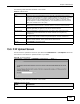
The following table describes the labels in this screen.
15.6 F/W Upload Screen
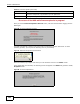
Use this screen to upload a firmware to your NWA. Click Maintenance > F/W Upload. Follow the
instructions in this section to upload firmware to your NWA.
Figure 65 Firmware Upload
The following table describes the labels in this screen.
Table 42 Channel Scan
LABEL DESCRIPTION
SSID This is the Service Set IDentification name of the AP in an Infrastructure wireless
network or wireless station in an Ad-Hoc wireless network. For our purposes, we define
an Infrastructure network as a wireless network that uses an AP and an Ad-Hoc
network (also known as Independent Basic Service Set (IBSS)) as one that doesn’t.
See the chapter on wireless configuration for more information on basic service sets
(BSS) and extended service sets (ESS).
Channel This is the index number of the channel currently used by the associated AP in an
Infrastructure wireless network or wireless station in an Ad-Hoc wireless network.
MAC Address This field displays the MAC address of the AP in an Infrastructure wireless network. It is
randomly generated (so ignore it) in an Ad-Hoc wireless network.
Wireless Mode This is the IEEE 802.1x standard used by your NWA to apply enhanced security
methods for both the authentication of wireless stations and encryption key
management.
Signal Strength This field displays the strength of the AP’s signal. If you must choose a channel that is
currently in use, choose one with low signal strength for minimum interference.
Security This is the wireless security method used by your NWA protect wireless communication
between wireless stations, access points and the wired network.
Refresh Click Refresh to reload the screen.
Table 43 Firmware Upload
LABEL DESCRIPTION
File Path Type in the location of the file you want to upload in this field or click Browse ... to find
it.