
User's Manual

Appendix E Text File Based Auto Configuration
NWA1100-N User’s Guide
192
Use the following procedure to have the AP download the configuration file.
Verifying Your Configuration File Upload Via SNMP
You can use SNMP management software to display the configuration file version currently on the
device by using the following MIB.
Troubleshooting Via SNMP
If you have any difficulties with the configuration file upload, you can try using the following MIB 10
to 20 seconds after using SNMP to have the AP download the configuration file.
Table 60 Configuration via SNMP
STEPS MIB VARIABLE VALUE
Step 1 pwTftpServer Set the IP address of the TFTP server.
Step 2 pwTftpFileName Set the file name, for example, g3000hcfg.txt.
Step 3 pwTftpFileType Set to 3 (text configuration file).
Step 4 pwTftpOpCommand Set to 2 (download).
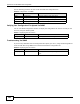
Table 61 Displaying the File Version
ITEM OBJECT ID DESCRIPTION
pwCfgVersion 1.3.6.1.4.1.890.1.9.1.2 This displays the current configuration file version.
Table 62 Displaying the File Version
ITEM OBJECT ID DESCRIPTION
pwTftpOpStatus 1.3.6.1.4.1.890.1.9.1.6 This displays the current operating status of the TFTP
client.