
User's Manual

NWA1100-N User’s Guide 23
CHAPTER 3
Status Screens
The Status screens display when you log into the NWA, or click Status in the navigation menu.
Use the Status screens to look at the current status of the device, system resources, and
interfaces. The Status screens also provide detailed information about system statistics, associated
wireless clients, and logs.
3.1 The Status Screen
Use this screen to get a quick view of system, Ethernet, WLAN and other information regarding
your NWA.
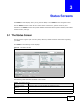
Click Status. The following screen displays.
Figure 14 The Status Screen
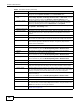
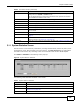
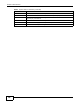
The following table describes the labels in this screen.
Table 2 The Status Screen
LABEL DESCRIPTION
Automatic Refresh
Interval
Select how often you want the NWA to update this screen.
Refresh Now Click this to update this screen immediately.
System Information