
User's Manual

NWA1100-N User’s Guide 27
CHAPTER 4
Tutorial
This chapter first provides an overview of how to configure the wireless LAN on your NWA, and then
gives step-by-step guidelines showing how to configure your NWA for some example scenarios.
4.1 How to Configure the Wireless LAN
This section illustrates how to choose which wireless operating mode to use on the NWA and how to
set up the wireless LAN in each wireless mode. See Section 4.1.3 on page 28 for links to more
information on each step.
4.1.1 Choosing the Wireless Mode
•Use Access Point operating mode if you want to allow wireless clients to access your wired
network, all using the same security and Quality of Service (QoS) settings. See Section 1.2.1 on
page 12 for details.
•Use Bridge / Repeater operating mode if you want to use the NWA to communicate with other
access points. See Section 1.2.2 on page 12 for details.
•Use AP + Bridge operating mode if you want to use the NWA as an access point (see above)
while also communicating with other access points. See Section 1.2.3 on page 14 for details.
•Use Wireless Client operating mode if you want to use the NWA to access a wireless network.
See Section 1.2.4 on page 15 for details.
The NWA is a bridge when other APs access your wired Ethernet network through the NWA.
•Use Multi SSID (Multiple Basic Service Set Identifier) operating mode if you want to use the
NWA as an access point with some groups of users having different security or QoS settings from
other groups of users. See Section 1.2.5 on page 16 for details.
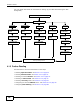
4.1.2 Wireless LAN Configuration Overview
The following figure shows the steps you should take to configure the wireless settings according to
the operating mode you select. Use the Web Configurator to set up your NWA’s wireless network