
User's Manual

Chapter 4 Tutorial
NWA1100-N User’s Guide
28
(see your Quick Start Guide for information on setting up your NWA and accessing the Web
Configurator).
4.1.3 Further Reading
Use these links to find more information on the steps:
•Selecting Operation Mode: see Section 5.4 on page 50.
• Choosing Wireless Mode: see Section 5.4 on page 50.
• Choosing a wireless Channel: see Section 5.4 on page 50.
• Choosing an SSID Profile: see Section 5.4 on page 50
• Choosing a Security mode: see Section 6.2 on page 67.
• Configuring an external RADIUS server: see Section 8.4 on page 85.
•Configuring MAC Filtering: see Section 9.4 on page 88.
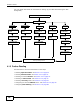
Select the WLAN Adaptor you want to configure.
Select Operation Mode.
Access Point
Bridge / Repeater
AP + Bridge
Wireless Client
Select Wireless Mode,
Configure RADIUS
authentication (optional).
Configure MAC Filter
(optional).
Select the AP you
Check your settings and test.
Configure Security
want to connect to.
Settings.
SSID Profile, and
Channel.
Select Wireless Mode,
Configure RADIUS
authentication (optional).
SSID Profile, and
Channel.
Select Wireless Mode,
Configure RADIUS
authentication (optional).
Configure MAC Filter
(optional).
SSID Profile, and
Channel.
Multi SSID
Select Wireless Mode
and SSID Profile.
Configure the selected
SSID Profiles.
Configure Security
Settings.
Configure RADIUS
authentication (optional).
Configure MAC Filter
(optional).