
User's Manual




Chapter 4 Tutorial
NWA1100-N User’s Guide
39
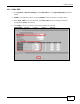
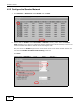
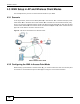
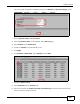
Log into the Web Configurator on NWA (A) and go to the Wireless > Wireless Settings screen.
1 Set the Operation Mode to Access Point.
2 Select the Wireless Mode. In this example, select 802.11b/g/n.
3 Select Profile1 as the SSID Profile.
4 Choose the Channel you want NWA (A) to use.
5 Click Apply.
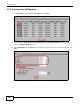
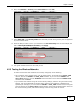
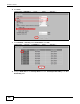
6 Go to Wireless > Multi SSID. Select Profile1 and click Edit.
7 Change the SSID to AP-A.
8 Select SecProfile1 in the Security field.
9 Select the check-box for Enable Intra-BSS Traffic blocking so the client cannot access other
clients on the same wireless network.