
User's Manual




Chapter 6 Multi SSID Screen
NWA1100-N User’s Guide
67
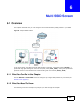
When the NWA is set to Access Point, AP + Bridge or MBSSID mode, you need to choose the SSID
profile(s) you want to use in your wireless network (see Section 5.4 on page 50 for more
information on operating modes).
To configure the settings of your SSID profile, you need to know the Media Access Control (MAC)
addresses of the devices you want to allow access to it.
Each SSID profile references the settings configured in the following screens:
• Wireless > Security (one of the security profiles)
• Wireless > RADIUS (one of the RADIUS profiles)
• Wireless > MAC Filter (the MAC filter list, if activated in the SSID profile)
Configure the fields in the above screens to use the settings in an SSID profile.
6.2 The Multi SSID Screen
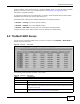
Use this screen to select the SSID profile you want to configure. Click Wireless > Multi SSID to
display the screen as shown.
Figure 25 Wireless > Multi SSID
The following table describes the labels in this screen.
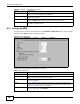
Figure 26 Wireless > Multi SSID
LABEL DESCRIPTION
Multi SSID
Index This field displays the index number of each SSID profile.
Profile Name This field displays the identification name of each SSID profile on the NWA.
SSID This field displays the name of the wireless profile on the network. When a wireless
client scans for an AP to associate with, this is the name that is broadcast and seen in
the wireless client utility.
Security This field indicates which security profile is currently associated with each SSID
profile. See Section 7.4.1 on page 75 for more information.