
User's Manual




Chapter 6 Multi SSID Screen
NWA1100-N User’s Guide
68
6.2.1 Configuring SSID
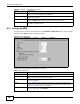
Use this screen to configure an SSID profile. In the Wireless > Multi SSID screen, select an SSID
profile and click Edit to display the following screen.
Figure 27 Multi SSID: Edit
The following table describes the labels in this screen.
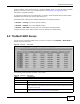
RADIUS This field displays which RADIUS profile is currently associated with each SSID
profile, if you have a RADIUS server configured.
QoS This field displays the Quality of Service setting for this profile or NONE if QoS is not
configured on a profile.
MAC Filter This field displays which MAC filter profile is currently associated with each SSID
profile, or Disable if MAC filtering is not configured on an SSID profile.
Edit Click the radio button next to the profile you want to configure and click Edit to go to
the SSID configuration screen.
Figure 26 Wireless > Multi SSID (continued)
LABEL DESCRIPTION
Table 9 Multi SSID: Edit
LABEL DESCRIPTION
Profile Name This is the name that identifying this profile.
SSID When a wireless client scans for an AP to associate with, this is the name that is
broadcast and seen in the wireless client utility.
Security Select a security profile to use with this SSID profile. See Section 7.4.1 on page 75
for more information.
RADIUS Select a RADIUS profile from the drop-down list box, if you have a RADIUS server
configured. If you do not need to use RADIUS authentication, ignore this field. See
Section 8.4 on page 85 for more information.
MAC Filtering
Select a MAC filter profile from the drop-down list box. If you do not want to use MAC
filtering on this profile, select Disable.