
User's Manual




Chapter 7 Wireless Security Screen
NWA1100-N User’s Guide
78
7.4.3 Security: 802.1x + Static WEP
This screen varies depending on whether you select Access Point, Multi SSID or Wireless Client
in the Wireless > Wireless Settings screen.
7.4.3.1 Access Point or Multi SSID
Use this screen to use 802.1x authentication with a static WEP key for your NWA that is in Access
Point or Multi SSID operating mode. Select 802.1X-Static64, 802.1X-Static128, or 802.1X-
Static152 in the Security Mode field to display the following screen.
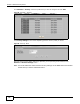
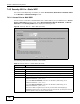
Figure 34 Security: 802.1x + Static WEP (AP mode)
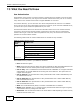
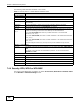
The following table describes the labels in this screen.
Table 16 Security: 802.1x + Static WEP (AP mode)
LABEL DESCRIPTION
Security Settings
Profile Name This is the name that identifying this profile.
Security Mode Choose 802.1X-Static64, 802.1X-Static128, or 802.1X-Static152 in this field.
Passphrase Enter the passphrase or string of text used for automatic WEP key generation.
Generate Click this to get the keys from the Passphrase you entered.
Key 1 to Key 4 If you chose 802.1X-Static64, then enter any 5 characters (ASCII string) or 10
hexadecimal characters ("0-9", "A-F").
If you chose 802.1X-Static128, then enter 13 characters (ASCII string) or 26
hexadecimal characters ("0-9", "A-F").
If you chose 802.1X-Static152, then enter 16 characters (ASCII string) or 32
hexadecimal characters ("0-9", "A-F").
There are four data encryption keys to secure your data from eavesdropping by
unauthorized wireless users. The values for the keys must be set up exactly the same on
the access points as they are on the wireless clients.