
User's Manual




Chapter 7 Wireless Security Screen
NWA1100-N User’s Guide
79
7.4.3.2 Wireless Client
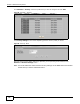
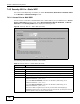
Use this screen to use 802.1x authentication with a static WEP key for your NWA that is in
Wireless Client operating mode. Select 802.1x in the Security Mode field to display the
following screen.
Figure 35 Security: 802.1x + Static WEP for Wireless Client
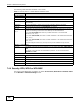
Rekey Options
ReAuthentication
Timer
Specify how often wireless stations have to resend user names and passwords in order to
stay connected.
Enter a time interval between 10 and 9999 seconds. Alternatively, enter “0” to turn
reauthentication off.
Note: If wireless station authentication is done using a RADIUS server, the reauthentication
timer on the RADIUS server has priority.
Group-Key
Update
The NWA automatically disconnects a wireless station from the wired network after a
period of inactivity. The wireless station needs to enter the user name and password again
before access to the wired network is allowed.
Apply Click Apply to save your changes.
Reset Click Reset to begin configuring this screen afresh.
Back Click Back to return to the previous screen.
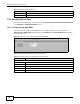
Table 16 Security: 802.1x + Static WEP (AP mode) (continued)
LABEL DESCRIPTION