
User's Manual



Chapter 7 Wireless Security Screen
NWA1100-N User’s Guide
82
7.4.4.2 Wireless Client
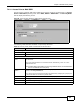
Use this screen to employ WPA or WPA2 as the security mode of your NWA that is in Wireless Client
operating mode. Select WPA or WPA2 in the Security Mode field to display the following screen.
Figure 37 Security: WPA or WPA2 for Wireless Client
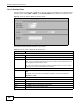
The following table describes the labels in this screen.
Table 19 Security: WPA or WPA2 for Wireless Client
LABEL DESCRIPTION
Security Settings
Profile Name This is the name that identifying this profile.
Security Mode Choose the same security mode used by the AP.
Data Encryption This shows the encryption method used by the NWA.
TKIP - This is the Temporal Key Integrity Protocol encryption method added later to the
WEP encryption protocol to further secure.
AES - This is the Advanced Encryption Standard encryption method. It is a more recent
development over TKIP and considerably more robust.
IEEE802.1x Authentication
EAP Type The options on the left refer to EAP methods. You can choose either TLS, LEAP, PEAP or
TTLS.
The options on the right refer to authentication protocols. You can choose between
MSCHAPv2 and GTC.
User Information
Username Supply the username of the account created in the RADIUS server.
Password Supply the password of the account created in the RADIUS server.
Apply Click Apply to save your changes.
Reset Click Reset to begin configuring this screen afresh.
Back Click Back to return to the previous screen.