
User's Manual

Chapter 3 Phone Use and Configuration
P-27XX Series User’s Guide
17
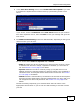
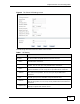
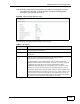
Figure 4 The Phone SIP Settings screen
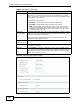
The following table describes the labels in this screen.
Table 1 SIP Setting
LABEL DESCRIPTION
Active SIP
Account
Select this if you want the ZyXEL Device to use this account. Clear it if
you do not want the ZyXEL Device to use this account.
Account
Name
Enter a descriptive name for this SIP account. You can use up to 127
printable ASCII characters.
Number Enter your SIP number. In the full SIP URI, this is the part before the @
symbol. You can use up to 127 printable ASCII characters.
SIP Display
Name
Enter the name that appears on the other party’s device if they have
Caller ID enabled. You can use up to 127 printable ASCII characters.
SIP Server
Address
Enter the IP address or domain name of the SIP server provided by
your VoIP service provider. You can use up to 95 printable ASCII
characters.
SIP Server
Port
Enter the SIP server’s listening port number, if your VoIP service
provider gave you one. Otherwise, keep the default value.
SIP Service
Domain
Enter the SIP service domain name. In the full SIP URI, this is the part
after the @ symbol. You can use up to 95 printable ASCII Extended set
characters.
Register
Expire (sec)
Enter the maximum amount of alloted time for the ZyXEL Device to
attempt to register with the SIP server.