
User's Manual


Chapter 3 Phone Use and Configuration
P-27XX Series User’s Guide
22
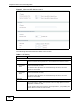
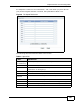
Figure 7 Advanced SIP Settings (part 3)
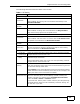
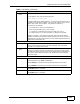
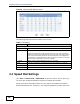
The following table describes the labels in this screen.
Table 4 SIP Setting
LABEL DESCRIPTION
Session Timer
Enable Select Enable if you want to define how long the ZyXEL Device waits to
receive a session-alive packet for a voice session from the SIP server.
Minimum
Expiration
Time
Enter the minimum time the ZyXEL Device waits for a session-alive
packet (90-65536 seconds).
If a session-alive packet is not received during this time, the voice
session is terminated.
Maximum
Expiration
Time
Enter the maximum time the ZyXEL Device waits for a session-alive
packet (90-65536 seconds).
If a session-alive packet is not received during this time, the voice
session is terminated.
Dial Plan
Active Select Active to enable the dial plan feature. A dial plan is used by a
service provider to define the expected rules and digit patterns for the
telephone numbers it uses.
If your dial plan does not match the service provider’s, you probably will
not be able to connect to their servers.