
User's Manual

Chapter 3 Phone Use and Configuration
P-27XX Series User’s Guide
25
the telephone number for local information, ‘411’, then when you press #01 on
your phone’s keypad and wait 3 seconds, the ZyXEL Device dials 4-1-1.
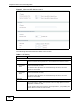
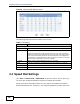
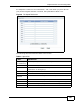
Figure 9 The Speed Dial Screen
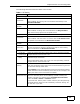
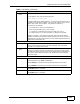
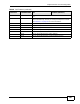
The following table describes the labels in this screen.
Table 6 Speed Dial
LABEL DESCRIPTION
Port Setting
(P-2702R only)
Select the phone port you want to configure in this screen.
Position This indicates the speed dial number.
Name Enter a name to associate with this speed dial number (such as
“Information” or “Emergency”).
Phone Number Enter a phone number to associate with this speed dial number.
Select Check this to select the speed dial number so it can be removed.
Remove
Selected
Click this to clear the settings for the selected speed dial number(s).
Remove All Click this to clear the settings for all speed dial numbers.
Back Click this to return to the previous screen with saving your changes.
Apply Click this to save your changes and then return to the previous screen.
Reset Click this to reset the options in this screen to their defaults.