
User's Manual



Chapter 1 Introduction
P-27XX Series User’s Guide
4
1.2 How It Works
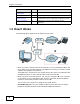
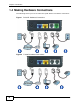
The following figure shows how the ZyXEL Device works:
• When you make a phone call over the Internet, you use a telephone (A) to dial
the number. The P-2701RL supports one telephone connection, and the P-2702R
supports two telephone connections.
The telephone is connected to your ZyXEL Device (C), which is connected to the
broadband modem or router that provides Internet access (D).
• When you want to use the Internet, you use your computer (B). Your computer
is connected to your ZyXEL Device (C), which is connected to the broadband
modem or router that provides Internet access (D).
You also use your computer to configure the ZyXEL Device.
• P-2701RL Only (E): Use your telephone (A) to make calls over the regular
telephone network (PSTN or Public Switched Telephone Network).
Wall Mounting
Instructions
47 How to attach the ZyXEL Device to a wall.
Safety Warnings 49 Using the ZyXEL Device safely.
Open Software
Announcements
49 Description of ZyXEL’s open software use and where to
download open source components modified by ZyXEL.
Legal Information 51 Certifications, warranty and customer support
information.
SECTION PAGE DESCRIPTION
A
C
D
B
E