
User's Manual


Chapter 1 Introduction
P-27XX Series User’s Guide
7
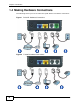
1 LINE (P-2701RL only): Use a telephone cable to connect the telephone jack (or
the TEL or PHONE jack on a splitter, if one is already installed) to this port.
2 PHONE 1 / PHONE 2: Use a telephone cable (and any telephone adaptor
provided with your ZyXEL Device) to connect your telephone to this port.
3 LAN: Use an Ethernet cable to connect your computer to this port.
4 WAN: Use an Ethernet cable to connect your broadband modem or router to this
port.
5 POWER: Use the power adaptor provided with your ZyXEL Device to connect an
appropriate power source to this jack.
On the front panel, the POWER light flashes green while your ZyXEL Device starts
up, and stays green once it is ready. The WAN and LAN lights turn on if the WAN
and LAN ports are properly connected. These lights flash when the ZyXEL Device
is sending or receiving data.