
User's Manual



Appendix A Setting Up Your Computer’s IP Address
P-660HW-Tx v3 User’s Guide
305
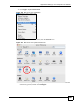
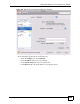
Figure 198 Mac OS X 10.5: Network Preferences > Ethernet
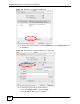
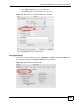
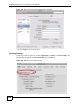
4 From the Configure list, select Using DHCP for dynamically assigned settings.
5 For statically assigned settings, do the following:
•From the Configure list, select Manually.
•In the IP Address field, enter your IP address.
•In the Subnet Mask field, enter your subnet mask.
•In the Router field, enter the IP address of your ZyXEL Device.