
User's Manual
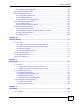
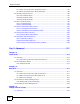

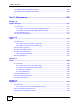
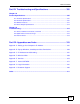


Table of Contents
P-660HN-F1 User’s Guide
18
18.3 Installing UPnP in Windows Example .............................................................................. 259
18.4 Using UPnP in Windows XP Example ............................................................................. 262
Part VI: Maintenance............................................................................ 269
Chapter 19
System Settings....................................................................................................................271
19.1 Overview .......................................................................................................................... 271
19.1.1 What You Can Do in the System Settings Screens ................................................ 271
19.1.2 What You Need to Know About System Settings ................................................... 271
19.2 The General Screen ........................................................................................................271
19.3 The Time Setting Screen ................................................................................................ 273
Chapter 20
Logs .......................................................................................................................................277
20.1 Overview .......................................................................................................................... 277
20.1.1 What You Can Do in the Log Screens .................................................................... 277
20.1.2 What You Need To Know About Logs .................................................................... 277
20.2 The View Log Screen ...................................................................................................... 277
20.3 The Log Settings Screen ................................................................................................. 278
20.4 SMTP Error Messages .................................................................................................... 280
20.4.1 Example E-mail Log ............................................................................................... 281
20.5 Log Descriptions .............................................................................................................. 281
Chapter 21
Tools.......................................................................................................................................289
21.1 Overview .......................................................................................................................... 289
21.1.1 What You Can Do in the Tool Screens ................................................................... 289
21.1.2 What You Need To Know About Tools .................................................................... 289
21.1.3 Before You Begin ................................................................................................... 290
21.1.4 Tool Examples ........................................................................................................ 291
21.2 The Firmware Screen ...................................................................................................... 295
21.3 The Configuration Screen ................................................................................................ 297
21.4 The Restart Screen ......................................................................................................... 299
Chapter 22
Diagnostic..............................................................................................................................301
22.1 Overview .......................................................................................................................... 301
22.1.1 What You Can Do in the Diagnostic Screens ......................................................... 301
22.2 The General Diagnostic Screen ...................................................................................... 301
22.3 The DSL Line Diagnostic Screen .................................................................................... 302