
User's Manual

Chapter 6 WAN Setup
P-660HW-Tx v3 Series User’s Guide
104
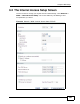
6.2.1 Advanced Internet Access Setup
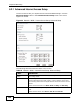
Use this screen to edit your ZyXEL Device's advanced WAN settings. Click the
Advanced Setup button in the Internet Access Setup screen. The screen
appears as shown.
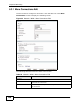
Figure 33 Network > WAN > Internet Access Setup: Advanced Setup
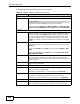
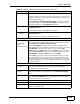
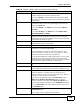
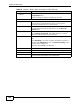
The following table describes the labels in this screen.
Table 20 Network > WAN > Internet Access Setup: Advanced Setup
LABEL DESCRIPTION
RIP & Multicast
Setup
This section is not available when you configure the ZyXEL Device to
be in bridge mode.
RIP Direction RIP (Routing Information Protocol) allows a router to exchange
routing information with other routers. Use this field to control how
much routing information the ZyXEL Device sends and receives on the
subnet.
Select the RIP direction from None, Both, In Only and Out Only.
RIP Version This field is not configurable if you select None in the RIP Direction
field.
Select the RIP version from RIP-1, RIP-2B and RIP-2M.