
User's Manual


Chapter 6 WAN Setup
P-660HW-Tx v3 Series User’s Guide
111
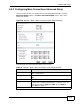
6.3.2 Configuring More Connections Advanced Setup
Use this screen to edit your ZyXEL Device's advanced WAN settings. Click the
Advanced Setup button in the More Connections Edit screen. The screen
appears as shown.
Figure 36 Network > WAN > More Connections: Edit: Advanced Setup
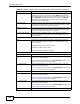
The following table describes the labels in this screen.
Table 23 Network > WAN > More Connections: Edit: Advanced Setup
LABEL DESCRIPTION
RIP & Multicast Setup This section is not available when you configure the ZyXEL Device
to be in bridge mode.
RIP Direction Select the RIP direction from None, Both, In Only and Out
Only.
RIP Version Select the RIP version from RIP-1, RIP-2B and RIP-2M.
Multicast IGMP (Internet Group Multicast Protocol) is a network-layer
protocol used to establish membership in a multicast group. The
ZyXEL Device supports IGMP-v1, IGMP-v2 and IGMP-v3.
Select None to disable it.
ATM QoS