
User's Manual


Chapter 7 LAN Setup
P-660HW-Tx v3 Series User’s Guide
124
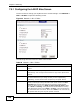
7.3 The DHCP Setup Screen
Use this screen to configure the DNS server information that the ZyXEL Device
sends to the DHCP client devices on the LAN. Click Network > DHCP Setup to
open this screen.
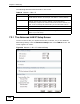
Figure 40 Network > LAN > DHCP Setup
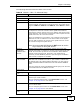
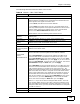
Protocol Filter Select the protocol filter(s) to control outgoing traffic. You may
choose up to 4 sets of filters.
You can configure protocol filters in the Packet Filter screen. See
Chapter 12 on page 219 for more details.
Generic Filter Select the generic filter(s) to control outgoing traffic. You may choose
up to 4 sets of filters.
You can configure generic filters in the Packet Filter screen. See
Chapter 12 on page 219 for more details.
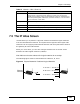
Back Click this to return to the previous screen without saving.
Apply Click this to save your changes.
Cancel Click this to restore your previously saved settings.
Table 25 Network > LAN > IP: Advanced Setup
LABEL DESCRIPTION