
User's Manual



Chapter 8 Wireless LAN
P-660HW-Tx v3 Series User’s Guide
140
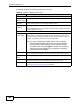
The following table describes the labels in this screen.
Table 29 Network > Wireless LAN > AP
LABEL DESCRIPTION
Wireless Setup
Active
Wireless LAN
Click the check box to activate wireless LAN.
Auto-Scan
Channel
Select this option to have the ZyXEL Device automatically scan for and
select a channel which is not used by another device.
Channel
Selection
Set the operating frequency/channel depending on your particular region.
Click the Scan button to list available channels and then select a channel
from the drop-down list box.
Common Setup
Network
Name (SSID)
The SSID (Service Set IDentity) identifies the service set with which a
wireless device is associated. Wireless devices associating to the access
point (AP) must have the same SSID. Enter a descriptive name (up to 32
printable 7-bit ASCII characters) for the wireless LAN.
Note: If you are configuring the ZyXEL Device from a computer
connected to the wireless LAN and you change the ZyXEL
Device’s SSID or WEP settings, you will lose your wireless
connection when you press Apply to confirm. You must then
change the wireless settings of your computer to match the
ZyXEL Device’s new settings.
Hide SSID Select this check box to hide the SSID in the outgoing beacon frame so a
station cannot obtain the SSID through scanning using a site survey tool.
Security
Mode
See the following sections for more details about this field.
MAC Filter This shows whether the wireless devices with the MAC addresses listed are
allowed or denied to access the ZyXEL Device using this SSID.
Edit Click this to go to the MAC Filter screen to configure MAC filter settings.
See Section 8.2.6 on page 147 for more details.