
User's Manual


Chapter 8 Wireless LAN
P-660HW-Tx v3 Series User’s Guide
144
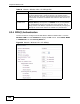
8.2.4 WPA(2) Authentication
Use this screen to configure and enable WPA or WPA2 authentication. Click the
Wireless LAN link under Network to display the AP screen. Select WPA, WPA2
or WPAMixed from the Security Mode list.
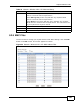
Figure 50 Network > Wireless LAN > AP: WPA(2)
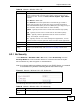
Idle Timeout The ZyXEL Device automatically disconnects a wireless station from
the wired network after a period of inactivity. The wireless station
needs to enter the username and password again before access to the
wired network is allowed. The default time interval is 3600 seconds (or
1 hour).
Group Key
Update Timer
The Group Key Update Timer is the rate at which the AP (if using
WPA(2)-PSK key management) or RADIUS server (if using WPA(2)
key management) sends a new group key out to all clients. The re-
keying process is the WPA(2) equivalent of automatically changing the
WEP key for an AP and all stations in a WLAN on a periodic basis.
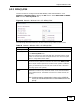
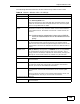
Table 32 Network > Wireless LAN > AP: WPA(2)-PSK
LABEL DESCRIPTION