
User's Manual


Chapter 8 Wireless LAN
P-660HW-Tx v3 Series User’s Guide
147
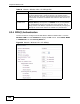
8.2.6 MAC Filter
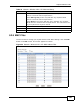
Use this screen to change your ZyXEL Device’s MAC filter settings. Click the Edit
button in the AP screen. The screen appears as shown.
Figure 52 Network > Wireless LAN > AP: MAC Address Filter
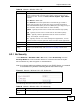
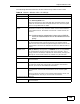
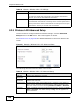
802.11 Mode Select 802.11b Only to allow only IEEE 802.11b compliant WLAN
devices to associate with the ZyXEL Device.
Select 802.11g Only to allow only IEEE 802.11g compliant WLAN
devices to associate with the ZyXEL Device.
Select Mixed to allow either IEEE 802.11b or IEEE 802.11g compliant
WLAN devices to associate with the ZyXEL Device. The transmission rate
of your ZyXEL Device might be reduced.
Back Click this to return to the previous screen without saving.
Apply Click this to save your changes.
Cancel Click this to restore your previously saved settings.
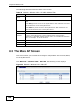
Table 34 Network > Wireless LAN > AP: Advanced Setup
LABEL DESCRIPTION