
User's Manual


Chapter 8 Wireless LAN
P-660HW-Tx v3 Series User’s Guide
150
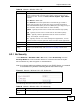
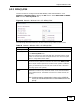
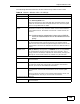
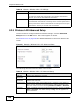
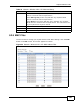
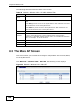
The following table describes the fields in this screen.
Table 37 Network > Wireless LAN > More AP: Edit
LABEL DESCRIPTION
Network Name
(SSID)
The SSID (Service Set IDentity) identifies the service set with which
a wireless device is associated. Enter a descriptive name (up to 32
printable 7-bit ASCII characters) for the wireless LAN.
Note: If you are configuring the ZyXEL Device from a computer
connected to the wireless LAN and you change the
ZyXEL Device’s SSID or security settings, you will lose
your wireless connection when you press Apply to
confirm. You must then change the wireless settings of
your computer to match the ZyXEL Device’s new settings.
Hide SSID Select this check box to hide the SSID in the outgoing beacon frame
so a station cannot obtain the SSID through scanning using a site
survey tool.
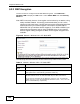
Security Mode See Section 8.2 on page 139 for more details about this field.
MAC Filter This shows whether the wireless devices with the MAC addresses
listed are allowed or denied to access the ZyXEL Device using this
SSID.
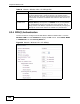
Edit Click this to go to the MAC Filter screen to configure MAC filter
settings. See Section 8.2.6 on page 147 for more details.
QoS This shows whether QoS (Quality of Service) is activated or the
priority level for wireless traffic with this SSID. Select a priority level
from the drop-down list box. Choices are None, Default, Highest,
High, Middle and Low.
Select None to disable QoS.
Select Default to have the ZyXEL Device automatically give traffic a
priority level according to the ToS value in the IP header of packets
it sends. WMM QoS (Wifi MultiMedia Quality of Service) gives high
priority to voice and video, which makes them run more smoothly.
Highest - Typically used for voice or video that should be high-
quality.
High - Typically used for voice or video that can be medium-quality.
Middle - Typically used for applications that do not fit into another
priority. For example, Internet surfing.
Low - Typically used for non-critical “background” applications, such
as large file transfers and print jobs that should not affect other
applications.
Back Click this to return to the previous screen without saving.
Apply Click this to save your changes.
Cancel Click this to restore your previously saved settings.