
User's Manual





Chapter 8 Wireless LAN
P-660HW-Tx v3 Series User’s Guide
155
8.7 The Scheduling Screen
Use the wireless LAN scheduling to configure the days you want to enable or
disable the wireless LAN. Click Network > Wireless LAN > Scheduling. The
following screen displays.
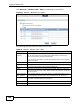
Figure 58 Network > Wireless LAN > Scheduling
The following table describes the labels in this screen.
Table 41 Network > Wireless LAN > QoS
LABEL DESCRIPTION
Enable
Wireless LAN
Scheduling
Select this box to activate wireless LAN scheduling on your ZyXEL
Device.
WLAN status Select On or Off to enable or disable the wireless LAN.
Day Check the day(s) you want to turn the wireless LAN on or off.
The following
times
Specify a time frame during which the schedule would apply.
For example, if you set the time range from 12:00 to 23:00, the wireless
LAN will be turned on only during this time period.
Apply Click this to save your changes.
Reset Click this to restore your previously saved settings.