
User's Manual



P-660HW-Tx v3 Series User’s Guide
189
CHAPTER 10
Firewalls
10.1 Overview
This chapter shows you how to enable and configure the ZyXEL Device firewall.
Use these screens to enable and configure the firewall that protects your ZyXEL
Device and network from attacks by hackers on the Internet and control access to
it. By default the firewall:
• allows traffic that originates from your LAN computers to go to all other
networks.
• blocks traffic that originates on other networks from going to the LAN.
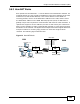
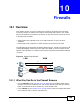
The following figure illustrates the default firewall action. User A can initiate an IM
(Instant Messaging) session from the LAN to the WAN (1). Return traffic for this
session is also allowed (2). However other traffic initiated from the WAN is blocked
(3 and 4).
Figure 76 Default Firewall Action
10.1.1 What You Can Do in the Firewall Screens
•Use the General screen (Section 10.2 on page 194) to enable firewall and/or
triangle route on the ZyXEL Device, and set the default action that the firewall
takes on packets that do not match any of the firewall rules.
•Use the Rules screen (Section 10.3 on page 196) to view the configured firewall
rules and add, edit or remove a firewall rule.
WAN
LAN
3
4
1
2
A