
User's Manual


Chapter 10 Firewalls
P-660HW-Tx v3 Series User’s Guide
191
10.1.3 Firewall Rule Setup Example
The following Internet firewall rule example allows a hypothetical “MyService”
connection from the Internet.
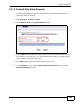
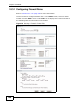
1 Click Security > Firewall > Rules.
2 Select WAN to LAN in the Packet Direction field.
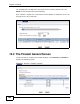
Firewall Example: Rules
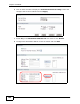
3 In the Rules screen, select the index number after that you want to add the rule.
For example, if you select “6”, your new rule becomes number 7 and the previous
rule 7 (if there is one) becomes rule 8.
4 Click Add to display the firewall rule configuration screen.
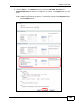
5 In the Edit Rule screen, click the Edit Customized Services link to open the
Customized Service screen.