
User's Manual


Chapter 10 Firewalls
P-660HW-Tx v3 Series User’s Guide
192
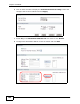
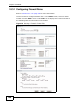
6 Click an index number to display the Customized Services Config screen and
configure the screen as follows and click Apply.
Edit Custom Port Example
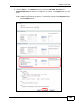
7 Select Any in the Destination Address List box and then click Delete.
8 Configure the destination address screen as follows and click Add.
Firewall Example: Edit Rule: Destination Address