
User's Manual


Chapter 10 Firewalls
P-660HW-Tx v3 Series User’s Guide
194
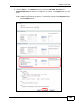
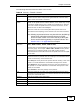
On completing the configuration procedure for this Internet firewall rule, the
Rules screen should look like the following.
Rule 1 allows a “MyService” connection from the WAN to IP addresses 10.0.0.10
through 10.0.0.15 on the LAN.
Firewall Example: Rules: MySe rvice
10.2 The Firewall General Screen
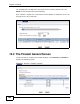
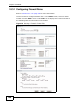
Use this screen to configure the firewall settings. Click Security > Firewall to
display the following screen.
Figure 77 Security > Firewall > General