
User's Manual


Chapter 10 Firewalls
P-660HW-Tx v3 Series User’s Guide
198
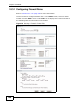
10.3.1 Configuring Firewall Rules
Refer to Section 10.1.2 on page 190 for more information.
Use this screen to configure firewall rules. In the Rules screen, select an index
number and click Add or click a rule’s Edit icon to display this screen and refer to
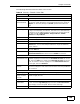
the following table for information on the labels.
Figure 79 Security > Firewall > Rules: Edit