
User's Manual


Chapter 10 Firewalls
P-660HW-Tx v3 Series User’s Guide
199
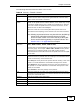
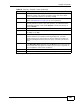
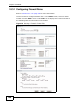
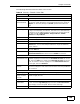
The following table describes the labels in this screen.
Table 54 Security > Firewall > Rules: Edit
LABEL DESCRIPTION
Edit Rule
Active Select this option to enable this firewall rule.
Action for
Matched Packet
Use the drop-down list box to select whether to discard (Drop), deny
and send an ICMP destination-unreachable message to the sender of
(Reject) or allow the passage of (Permit) packets that match this
rule.
Source/Destination Address
Address Type Do you want your rule to apply to packets with a particular (single) IP,
a range of IP addresses (for instance, 192.168.1.10 to 192.169.1.50),
a subnet or any IP address? Select an option from the drop-down list
box that includes: Single Address, Range Address, Subnet
Address and Any
Address.
Start IP Address Enter the single IP address or the starting IP address in a range here.
End IP Address Enter the ending IP address in a range here.
Subnet Mask Enter the subnet mask here, if applicable.
Add >> Click Add >> to add a new address to the Source or Destination
Address box. You can add multiple addresses, ranges of addresses,
and/or subnets.
Edit << To edit an existing source or destination address, select it from the box
and click Edit <<.
Delete Highlight an existing source or destination address from the Source or
Destination Address box above and click Delete to remove it.
Services
Available/
Selected Services
Please see Appendix E on page 411 for more information on services
available. Highlight a service from the Available Services box on the
left, then click Add >> to add it to the Selected Services box on the
right. To remove a service, highlight it in the Selected Services box
on the right, then click Remove.
Edit Customized
Service
Click the Edit Customized Services link to bring up the screen that
you use to configure a new custom service that is not in the predefined
list of services.
Schedule
Day to Apply Select everyday or the day(s) of the week to apply the rule.
Time of Day to
Apply (24-Hour
Format)
Select All Day or enter the start and end times in the hour-minute
format to apply the rule.
Log
Log Packet Detail
Information
This field determines if a log for packets that match the rule is created
or not. Go to the Log Settings page and select the Access Control
logs category to have the ZyXEL Device record these logs.
Alert