
User's Manual




Chapter 10 Firewalls
P-660HW-Tx v3 Series User’s Guide
201
10.3.3 Configuring a Customized Service
Use this screen to add a customized rule or edit an existing rule. Click a rule
number in the Firewall Customized Services screen to display the following
screen.
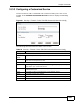
Figure 81 Security > Firewall > Rules: Edit: Edit Customized Services: Config
The following table describes the labels in this screen.
Table 56 Security > Firewall > Rules: Edit: Edit Customized Services: Config
LABEL DESCRIPTION
Config
Service
Name
Type a unique name for your custom port.
Service Type Choose the IP port (TCP, UDP or TCP/UDP) that defines your customized
port from the drop down list box.
Port Configuration
Type Click Single to specify one port only or Range to specify a span of ports
that define your customized service.
Port Number Type a single port number or the range of port numbers that define your
customized service.
Back Click this to return to the previous screen without saving.
Apply Click this to save your changes.
Cancel Click this to restore your previously saved settings.
Delete Click this to delete the current rule.