
User's Manual




Chapter 11 Content Filtering
P-660HW-Tx v3 Series User’s Guide
214
11.2 The Keyword Screen
Use this screen to block sites containing certain keywords in the URL. For
example, if you enable the keyword "bad", the ZyXEL Device blocks all sites
containing this keyword including the URL http://www.website.com/bad.html.
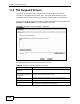
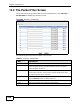
To have your ZyXEL Device block websites containing keywords in their URLs, click
Security > Content Filter. The screen appears as shown.
Figure 87 Security > Content Filtering > Keyword
The following table describes the labels in this screen.
Table 58 Security > Content Filtering > Keyword
LABEL DESCRIPTION
Active Keyword
Blocking
Select this check box to enable this feature.
Block Websites that
contain these keywords
in the URL:
This box contains the list of all the keywords that you have
configured the ZyXEL Device to block.
Delete Highlight a keyword in the box and click this to remove it.
Clear All Click this to remove all of the keywords from the list.
Keyword Type a keyword in this field. You may use any character (up to
127 characters). Wildcards are not allowed.