
User's Manual




Chapter 11 Content Filtering
P-660HW-Tx v3 Series User’s Guide
215
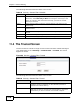
11.3 The Schedule Screen
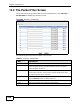
Use this screen to set the days and times for the ZyXEL Device to perform content
filtering. Click Security > Content Filter > Schedule. The screen appears as
shown.
Figure 88 Security > Content Filter > Schedule
Add Keyword Click this after you have typed a keyword.
Repeat this procedure to add other keywords. Up to 64
keywords are allowed.
When you try to access a web page containing a keyword, you
will get a message telling you that the content filter is blocking
this request.
Apply Click this to save your changes.
Cancel Click this to restore your previously saved settings.
Table 58 Security > Content Filtering > Keyword (continued)
LABEL DESCRIPTION