
User's Manual




Chapter 11 Content Filtering
P-660HW-Tx v3 Series User’s Guide
216
The following table describes the labels in this screen.
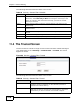
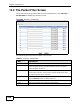
11.4 The Trusted Screen
Use this screen to exclude a range of users on the LAN from content filtering on
your ZyXEL Device. Click Security > Content Filter > Trusted. The screen
appears as shown.
Figure 89 Security > Content Filter: Trusted
The following table describes the labels in this screen.
Table 59 Security > Content Filter: Schedule
LABEL DESCRIPTION
Schedule Select Block Everyday to make the content filtering active everyday.
Otherwise, select Edit Daily to Block and configure which days of the
week (or everyday) and which time of the day you want the content
filtering to be active.
Active Select the check box to have the content filtering to be active on the
selected day.
Start TIme Enter the time when you want the content filtering to take effect in hour-
minute format.
End Time Enter the time when you want the content filtering to stop in hour-minute
format.
Apply Click this to save your changes.
Cancel Click this to restore your previously saved settings.
Table 60 Security > Content Filter: Trusted
LABEL DESCRIPTION
Start IP Address Type the IP address of a computer (or the beginning IP address of
a specific range of computers) on the LAN that you want to
exclude from content filtering.
End IP Address Type the ending IP address of a specific range of users on your
LAN that you want to exclude from content filtering. Leave this
field blank if you want to exclude an individual computer.