
User's Manual




P-660HW-Tx v3 Series User’s Guide
219
CHAPTER 12
Packet Filter
12.1 Overview
Your ZyXEL Device uses filters to decide whether to allow passage of traffic. This
chapter discusses how to create and apply filters.
12.1.1 What You Can Do in the Packet Filter Screen
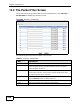
Use the Packet Filter screens (Section 12.2 on page 220) to display the filter sets
and configure the rules for protocol and generic filters.
12.1.2 What You Need to Know About the Packet Filter
Filters
Your ZyXEL Device uses filters to decide whether to allow passage of a data
packet. Filters are subdivided into generic and protocol filters. Generic filter rules
act on the raw data from/to LAN and WAN. Protocol filter rules act on IP packets.
Filter Structure
A filter set consists of one or more filter rules. The ZyXEL Device allows you to
configure up to twelve filter sets with six rules in each set, for a total of 72 filter
rules in the system. You cannot mix generic filter rules and protocol filter rules
within the same set. You can apply up to four filter sets to a particular port to
block multiple types of packets. With each filter set having up to six rules, you can
have a maximum of 24 rules active for a single port.
Finding Out More
See Section 12.3 on page 226 for technical background information on packet
filters.