
User's Manual




Chapter 12 Packet Filter
P-660HW-Tx v3 Series User’s Guide
220
12.2 The Packet Filter Screen
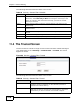
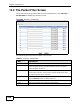
Use this screen to set up packet filters on your ZyXEL Device. Click Security >
Packet Filter to display the following screen.
Figure 90 Security > Packet Filter
The following table describes the labels in this screen.
Table 61 Security > Packet Filter
LABEL DESCRIPTION
# This field displays the index number of the filter set.
Name Enter a name for the filter set. The text may consist of up to 16
letters, numerals and any printable character found on a typical
English language keyboard.
Filter Type Select Protocol Filter or Generic Filter for your filter set.
Protocol filter rules are used to filter IP packets while generic filter
rules allow filtering of non-IP packets.
Modify Click the Edit button to configure a filter set.
Click the Remove button to delete a filter set.
Apply Click this to save your changes.
Cancel Click this to restore your previously saved settings.