
User's Manual





Chapter 12 Packet Filter
P-660HW-Tx v3 Series User’s Guide
225
12.2.4 Configuring Generic Packet Rules
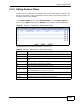
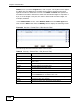
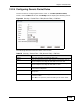
Use this screen to configure generic filter rules. In the Edit (Generic Filter)
screen, click the Edit button from the Modify field to display the following screen.
Figure 94 Security > Packet Filter > Edit (Generic Filter) > Edit Rule
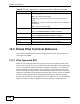
The following table describes the labels in this screen.
Table 65 Security > Packet Filter > Edit (Generic Filter) > Edit Rule
LABEL DESCRIPTION
Active Select the check box to enable the filter rule.
Offset Enter the starting byte of the data portion in the packet that you
wish to compare. The range for this field is from 0 to 255.
Length Enter the byte count of the data portion in the packet that you
wish to compare. The range for this field is 0 to 8.
Mask Enter the mask (in hexadecimal notation) to apply to the data
portion before comparison.
Value Enter the value (in hexadecimal notation) to compare with the
data portion.
More Select Yes to pass a matching packet to the next filter rule before
an action is taken.
Select No to act upon the packet according to the action fields.