
User's Manual


Chapter 13 Certificates
P-660HW-Tx v3 Series User’s Guide
232
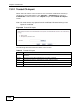
13.2.1 Trusted CA Import
Follow the instructions in this screen to save a trusted certification authority’s
certificate to the ZyXEL Device. Click Security > Certificates to open the
Trusted CAs screen and then click Import to open the Trusted CA Import
screen.
Note: You must remove any spaces from the certificate’s filename before you can
import the certificate.
Figure 98 Trusted CA Import
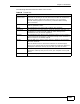
The following table describes the labels in this screen.
Table 67 Trusted CA Import
LABEL DESCRIPTION
File Path Type in the location of the file you want to upload in this field or click Browse
to find it.
Browse Click this to find the certificate file you want to upload.
Back Click this to return to the previous screen without saving.
Apply Click this to save the certificate on the ZyXEL Device.
Cancel Click this to restore your previously saved settings.