
User's Manual





Chapter 14 Static Route
P-660HW-Tx v3 Series User’s Guide
241
14.2.1 Static Route Edit
Use this screen to configure the required information for a static route. Select a
static route index number and click Edit. The screen shown next appears.
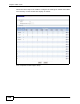
Figure 102 Advanced > Static Route: Edit
The following table describes the labels in this screen.
Apply Click this to save your changes.
Cancel Click this to restore your previously saved settings.
Table 69 Advanced > Static Route
LABEL DESCRIPTION
Table 70 Advanced > Static Route: Edit
LABEL DESCRIPTION
Active This field allows you to activate/deactivate this static route.
Route Name Enter the name of the IP static route. The text may consist of up to 9
letters, numerals and any printable character found on a typical English
language keyboard. Leave this field blank to delete this static route.
Destination IP
Address
This parameter specifies the IP network address of the final destination.
Routing is always based on network number. If you need to specify a
route to a single host, use a subnet mask of 255.255.255.255 in the
subnet mask field to force the network number to be identical to the host
ID.
IP Subnet
Mask
Enter the IP subnet mask here.
Gateway Type Use either Gateway Address or Gateway Node to configure a static
route.