
User's Manual





Chapter 15 802.1Q/1P
P-660HW-Tx v3 Series User’s Guide
249
15.2 The 802.1Q/1P Group Setting Screen
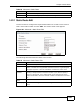
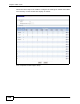
Use this screen to activate 802.1Q/1P and display the VLAN groups. Click
Advanced > 802.1Q/1P to display the following screen.
Figure 104 Advanced > 802.1Q/1P > Group Setting
The following table describes the labels in this screen.
Table 71 Advanced > 802.1Q/1P > Group Setting
LABEL DESCRIPTION
802.1Q/1P
Active Select this check box to activate the 802.1P/1Q feature.
Management Vlan
ID
Enter the ID number of a VLAN group. All interfaces (ports, SSIDs and
PVCs) are in the management VLAN by default. If you disable the
management VLAN, you will not be able to access the ZyXEL Device.
Summary
# This field displays the index number of the VLAN group.