
User's Manual





Chapter 15 802.1Q/1P
P-660HW-Tx v3 Series User’s Guide
250
15.2.1 Editing 802.1Q/1P Group Setting
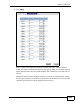
Use this screen to configure the settings for each VLAN group.
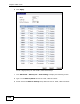
In the 802.1Q/1P screen, click the Edit button from the Modify filed to display
the following screen.
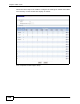
Figure 105 Advanced > 802.1Q/1P > Group Setting > Edit
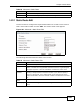
Name This field displays the name of the VLAN group.
VID This field displays the ID number of the VLAN group.
Port Number These columns display the VLAN’s settings for each port. A tagged
port is marked as T, an untagged port is marked as U and ports not
participating in a VLAN are marked as “–“.
Modify Click the Edit button to configure the the ports in the VLAN group.
Click the Remove button to delete the VLAN group.
Apply Click this to save your changes.
Cancel Click this to restore your previously saved settings.
Table 71 Advanced > 802.1Q/1P > Group Setting (continued)
LABEL DESCRIPTION