
User's Manual




Chapter 15 802.1Q/1P
P-660HW-Tx v3 Series User’s Guide
251
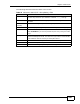
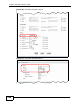
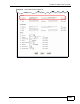
The following table describes the labels in this screen.
Table 72 Advanced > 802.1Q/1P > Group Setting > Edit
LABEL DESCRIPTION
Name Enter a descriptive name for the VLAN group for identification purposes.
The text may consist of up to 8 letters, numerals, “-”, “_” and “@”.
VLAN ID Assign a VLAN ID for the VLAN group. The valid VID range is between 1
and 4094.
Default
Gateway
Select the default gateway for the VLAN group.
Ports This field displays the types of ports available to join the VLAN group.
Control Select Fixed for the port to be a permanent member of the VLAN group.
Select Forbidden if you want to prohibit the port from joining the VLAN
group.
Tx Tag Select Tx Tagging if you want the port to tag all outgoing traffic
trasmitted through this VLAN. You select this if you want to create VLANs
across different devices and not just the ZyXEL Device.
Back Click this to return to the previous screen without saving.
Apply Click this to save your changes.
Cancel Click this to restore your previously saved settings.