
User's Manual




Chapter 15 802.1Q/1P
P-660HW-Tx v3 Series User’s Guide
252
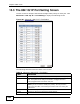
15.3 The 802.1Q/1P Port Setting Screen
Use this screen to configure the PVID and assign traffic priority for each port. Click
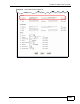
Advanced > 802.1Q/1P > Port Setting to display the following screen.
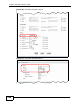
Figure 106 Advanced > 802.1Q/1P > Port Setting
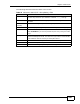
The following table describes the labels in this screen.
Table 73 Advanced > 802.1Q/1P > Port Setting
LABEL DESCRIPTION
Ports This field displays the types of ports available to join the VLAN group.
802.1Q PVID Assign a VLAN ID for the port. The valid VID range is between 1 and
4094. The ZyXEL Device assigns the PVID to untagged frames or
priority-tagged frames received on this port.
802.1P Priority Assign a priority for the traffic transmitted through the port. Select
Same if you do not want to modify the priority. You may choose a
priority level from 0-7, with 0 being the lowest level and 7 being the
highest level.
Apply Click this to save your changes.
Cancel Click this to restore your previously saved settings.