
User's Manual



Chapter 1 Introducing the ZyXEL Device
P-660HW-Tx v3 Series User’s Guide
26
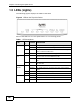
1.5 LEDs (Lights)
The following graphic displays the labels of the LEDs.
Figure 2 LEDs on the Top of the Device
None of the LEDs are on if the ZyXEL Device is not receiving power.
Table 1 LED Descriptions
LED
COLO
R
STATUS DESCRIPTION
POWER Green On The ZyXEL Device is receiving power and ready for use.
Blinking The ZyXEL Device is self-testing.
Red On The ZyXEL Device detected an error while self-testing, or
there is a device malfunction.
Off The ZyXEL Device is not receiving power.
ETHERNET
1-4
Green On The ZyXEL Device has an Ethernet connection with a
device on the Local Area Network (LAN).
Blinking The ZyXEL Device is sending/receiving data to /from the
LAN.
Off The ZyXEL Device does not have an Ethernet connection
with the LAN.
WPS/
WLAN
Green On The wireless network is activated.
Blinking The ZyXEL Device is communicating with other wireless
clients.
Orange Blinking The ZyXEL Device is setting up a WPS connection.
Off The wireless network is not activated.
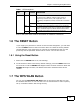
DSL Green On The DSL line is up.
Blinking The ZyXEL Device is initializing the DSL line.
Off The DSL line is down.