
User's Manual




Chapter 16 Quality of Service (QoS)
P-660HW-Tx v3 Series User’s Guide
260
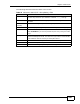
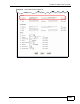
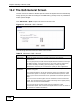
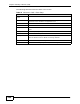
The following table describes the labels in this screen.
Table 75 Advanced > QoS > Class Setup
LABEL DESCRIPTION
Create a new
Class
Click this to create a new classifier.
No This is the number of each classifier. The ordering of the classifiers is
important as the classifiers are applied in turn.
Active Select the check box to enable this classifier.
Name This is the name of the classifier.
Interface This shows the interface from which traffic of this classifier should
come.
Priority This is the priority assigned to traffic of this classifier.
Filter Content This shows criteria specified in this classifier.
Modify Click the Edit icon to go to the screen where you can edit the classifier.
Click the Remove icon to delete an existing classifier.
Apply Click this to save your changes.
Cancel Click this to restore your previously saved settings.